
Dynamic Framework vs Static Framework in iOS
When developing iOS applications, understanding the differences between Dynamic Framework and Static Framework is extremely important. This article will help you deeply understand how they work, their loading mechanisms, and when to use each type.
📚 Basic Concepts
Static Library/Framework
Static Library (.a file) or Static Framework is a collection of object files bundled together. When you build the app, all code from the static library is copied directly into the app binary.
Dynamic Framework
Dynamic Framework (.framework or .dylib) is a bundle containing compiled code, resources, and headers. The code is not copied into the app binary but is linked and loaded at runtime.
🔧 Loading Mechanism into App
Static Framework - Link Time Loading
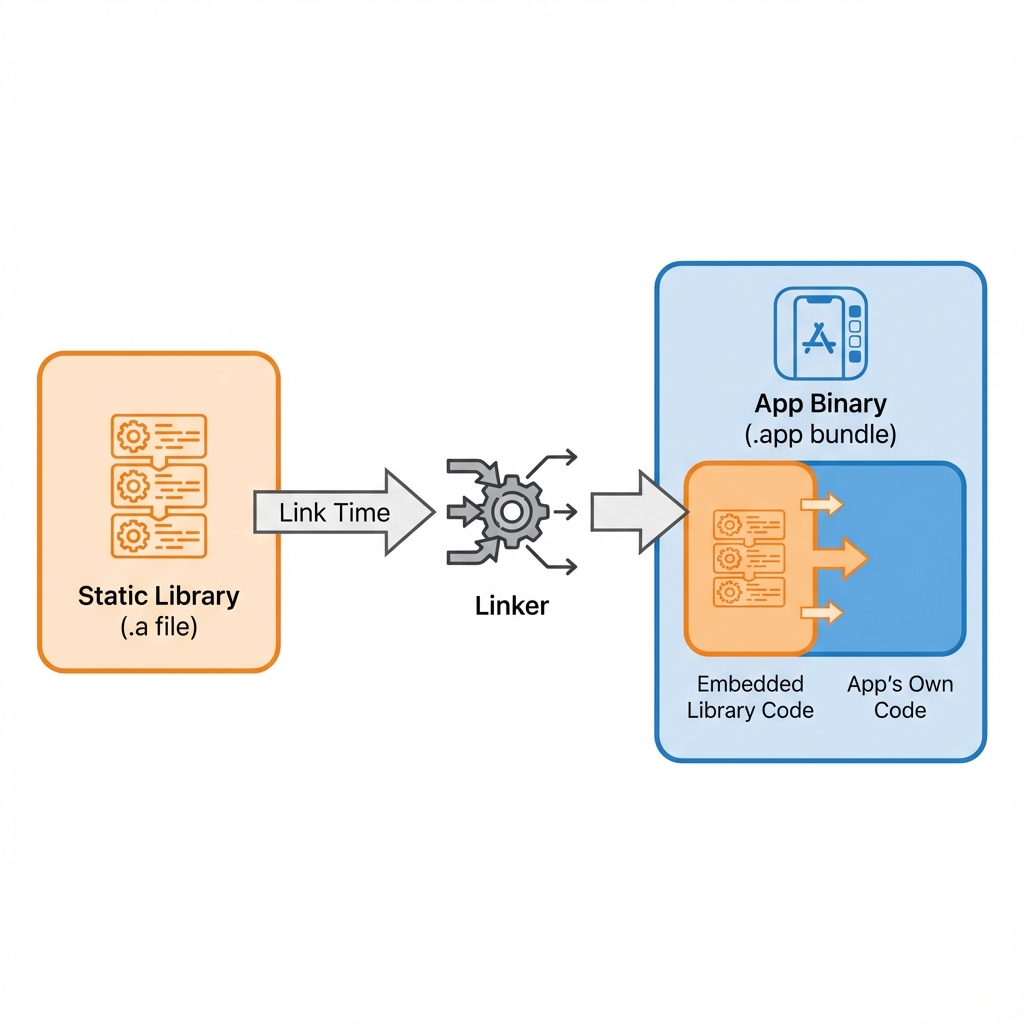
With Static Framework, the process works as follows:
┌─────────────────┐     ┌──────────────┐     ┌─────────────────────┐
│ Static Library  │────▶│    Linker    │────▶│    App Binary       │
│   (.a file)     │     │  (Link Time) │     │ (Contains all code) │
└─────────────────┘     └──────────────┘     └─────────────────────┘
        │                                              │
        │           CODE IS COPIED                     │
        └──────────────────────────────────────────────┘
Process:
- Compile Time: Compiler compiles source code into object files (
.o) - Link Time: Linker (
ld) takes all object files from the static library and copies them directly into the app binary - Runtime: App runs with all code already embedded - no additional loading required
Dynamic Framework - Runtime Loading
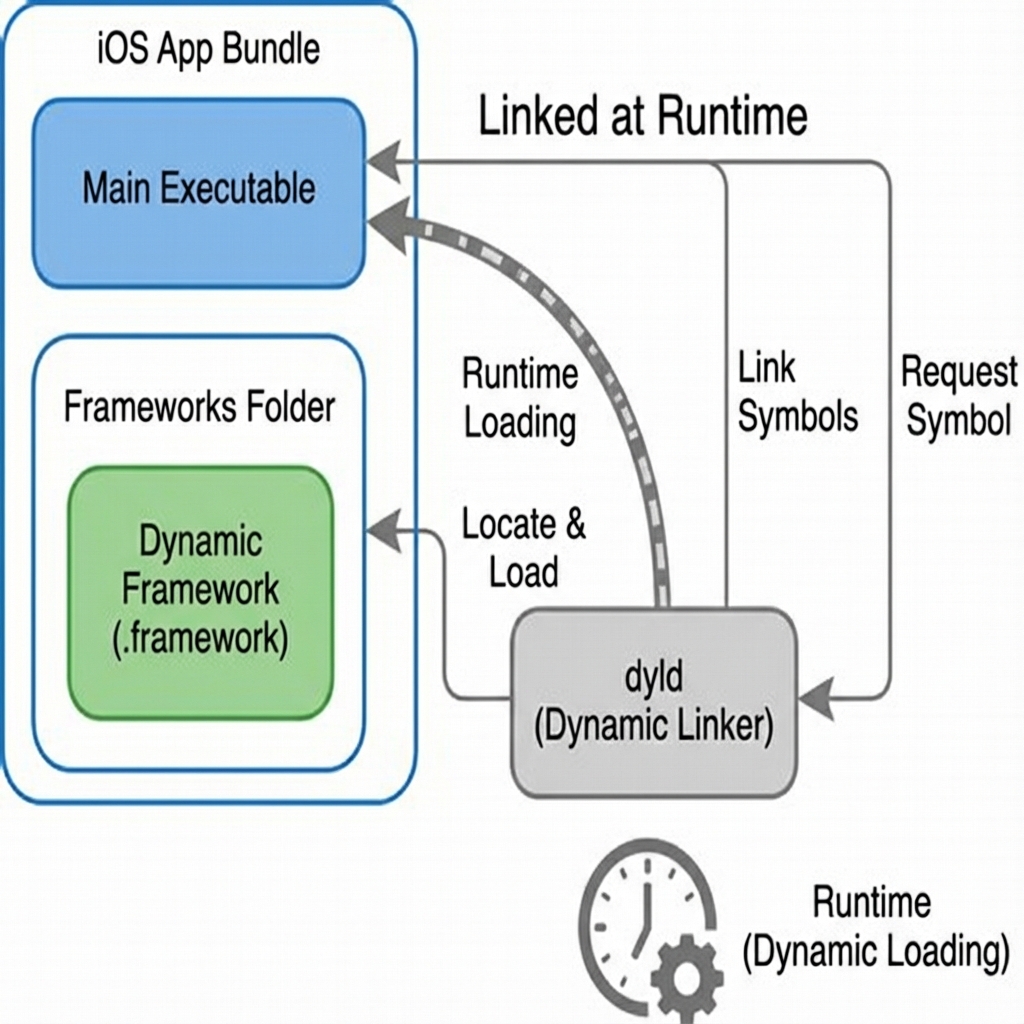
With Dynamic Framework, the process is more complex:
┌─────────────────┐     ┌──────────────┐     ┌─────────────────────┐
│    App Bundle   │     │     dyld     │     │ Dynamic Framework   │
│  (Executable)   │◀───▶│  (Runtime)   │◀───▶│   (.framework)      │
└─────────────────┘     └──────────────┘     └─────────────────────┘
                              │
                    ┌─────────┴─────────┐
                    │ LOAD AT RUNTIME   │
                    │ via @rpath        │
                    └───────────────────┘
Process:
- Compile Time: Framework is compiled separately
- Link Time: Linker only records a reference to the framework (no code copied)
- Runtime: When app launches,
dyld(dynamic linker) will:- Read dependencies from Mach-O header
- Find framework in
@rpath(usuallyFrameworks/in app bundle) - Load framework into memory
- Resolve symbols and perform binding
🔄 Detailed Comparison: dyld Process
Launch Time with Dynamic Framework
App Launch
    │
    ▼
┌─────────────────────────────────────────┐
│            dyld (Dynamic Linker)         │
├─────────────────────────────────────────┤
│ 1. Load App Executable                   │
│ 2. Parse Mach-O Header                   │
│ 3. Find LC_LOAD_DYLIB commands           │
│ 4. For each dynamic library:             │
│    ├── Search in @rpath                  │
│    ├── Map into memory                   │
│    ├── Verify code signature             │
│    └── Perform symbol binding            │
│ 5. Run initializers (+load, __attribute__)│
│ 6. Jump to main()                        │
└─────────────────────────────────────────┘
Launch Time with Static Framework
App Launch
    │
    ▼
┌─────────────────────────────────────────┐
│         Simpler Launch Process           │
├─────────────────────────────────────────┤
│ 1. Load App Executable (contains all)    │
│ 2. Run initializers                      │
│ 3. Jump to main()                        │
└─────────────────────────────────────────┘
⚖️ Pros and Cons
Static Framework
| ✅ Pros | ❌ Cons |
|---|---|
| Faster startup - No need to load from disk at runtime | Larger app size - Code is duplicated if multiple targets share it |
| Easy to distribute - Only need 1 binary file | Cannot share between apps - Each app has its own copy |
| No dyld issues - Avoid crashes due to missing framework | Longer build time - Linker must copy and link all code |
| Dead code stripping - Linker can remove unused code | Difficult to update - Must rebuild entire app to update library |
| More secure - Harder to extract the framework separately | Symbol conflicts - Can conflict if 2 static libs share a dependency |
Dynamic Framework
| ✅ Pros | ❌ Cons |
|---|---|
| Smaller app size - Can share between app and extensions | Slower startup - dyld needs time to load |
| Hot-swappable - Can update framework without rebuilding app | More complex - Need to manage @rpath and embedding correctly |
| Memory efficient - Framework is shared in memory | Crash potential - Missing framework = immediate crash |
| App Extensions - Required for sharing code | Code signature - Each framework needs separate signing |
| Faster incremental builds - Only rebuild changed framework | No dead code stripping - Entire framework is included |
📊 When to Use Each Type?
Use Static Framework when:
// ✅ Small third-party libraries
// ✅ Core utilities used everywhere
// ✅ No App Extensions
// ✅ Prioritize launch time
// ✅ Distributing closed-source SDK
- Small libraries used throughout the app
- You want to optimize launch time
- No need to share code with App Extensions
- Distributing SDK for third-party (easier to integrate)
Use Dynamic Framework when:
// ✅ Sharing code with App Extensions
// ✅ Large frameworks (SwiftUI, Combine, etc.)
// ✅ Modular architecture
// ✅ Hot-patching needed
// ✅ Reducing app bundle size
- You have App Extensions (Share, Today, Watch, etc.)
- Need modular architecture with multiple targets
- Large libraries not needed at app startup
- Large team, need independent module builds
🛠 Configuration in Xcode
Create Static Framework
# Podspec
Pod::Spec.new do |s|
  s.name = 'MyLibrary'
  s.static_framework = true  # 👈 Key setting
end
Or in Xcode:
- Build Settings → Mach-O Type →
Static Library
Create Dynamic Framework
# Podspec
Pod::Spec.new do |s|
  s.name = 'MyLibrary'
  # Default is dynamic framework
end
In Xcode:
- Build Settings → Mach-O Type →
Dynamic Library - General → Frameworks, Libraries → Embed & Sign
🔍 Check Framework Type
You can check if a framework is static or dynamic using this command:
# Check Mach-O type
$ file MyFramework.framework/MyFramework
MyFramework.framework/MyFramework: Mach-O universal binary with 2 architectures

# More details
$ otool -l MyFramework.framework/MyFramework | grep -A 2 LC_ID

# If you see LC_ID_DYLIB → Dynamic
# If not → Static
💡 Best Practices
-
Prefer Static for SPM packages - Swift Package Manager defaults to static linking, which is a good choice for most cases
-
Use Dynamic for App Extensions - If app has extensions, use dynamic framework to share code and reduce size
-
Avoid embedding dynamic frameworks if not necessary - Each dynamic framework adds ~100-500ms to launch time
-
Merge static libraries - If you have many static libs, consider merging them to reduce link time
-
Use
@_implementationOnly- When exposing API, use this annotation to hide internal dependencies
🎯 Conclusion
Choosing between Static and Dynamic Framework depends on:
- App architecture: Do you have extensions?
- Team size: Need independent builds?
- Performance priority: Launch time or app size?
- Distribution method: SDK for third-party or internal use?
Understanding how both types work will help you make the right decision for your project.
References:
- Apple Documentation - Dynamic Library Programming Topics
- WWDC 2016 - Optimizing App Startup Time
- dyld source code